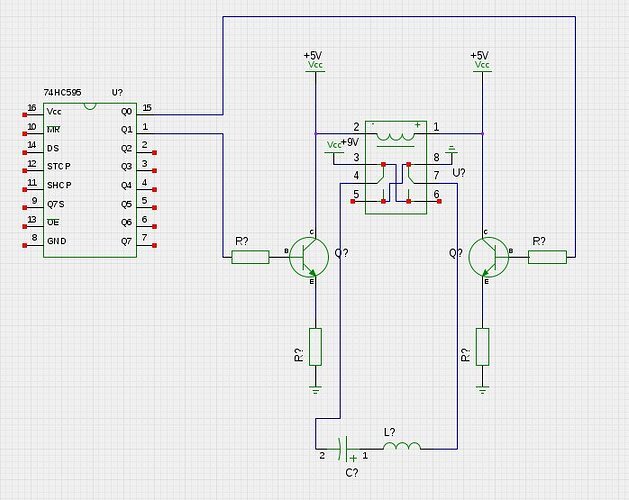
For anyone looking to bring a circuit to life, understanding the language of schematics is non-negotiable. Among the most versatile components you'll encounter is the Double Pole Double Throw (DPDT) relay, a workhorse in everything from industrial automation to automotive systems. Mastering the art of decoding DPDT relay schematic diagrams isn't just about reading lines on a page; it's about unlocking a powerful ability to control multiple circuits with a single, elegant command.
It sounds complex, but trust me, by the time you're done here, you'll be tracing current paths and anticipating relay actions with the confidence of a seasoned pro. Consider this your definitive guide to understanding, wiring, and leveraging the humble yet mighty DPDT relay.
At a Glance: Key Takeaways for DPDT Relay Schematics
- What it Is: A DPDT relay is an electrically operated switch that controls two separate circuits ("double pole") and can toggle each between two different connections ("double throw").
- Core Components: It always features a coil (the electromagnet that activates it) and two independent sets of contacts (Common, Normally Open, Normally Closed).
- Schematic Symbols: Recognize the square/rectangle for the coil and the switch-like symbols for the contacts, often shown in their de-energized (default) state.
- "Normally" Means De-energized: NC (Normally Closed) contacts are connected when the coil is off. NO (Normally Open) contacts are disconnected when the coil is off.
- Wiring Principle: Connect the coil to your control power. Connect your loads and power sources to the contact terminals, utilizing the NC and NO states to route current as needed.
- Safety First: Always match relay specifications (coil voltage, contact current rating) to your application, and consult manufacturer datasheets.
The DPDT Relay: More Than Just a Simple Switch
Before we dive into the hieroglyphs of a schematic, let's nail down what a DPDT relay actually is. Imagine a regular light switch that controls one light. Now imagine you need one switch to turn off the living room light and turn on the patio light simultaneously. That's getting closer to what a relay does. A DPDT relay takes this concept further, effectively giving you two independent switches operated by a single electrical signal.
At its heart, a relay is an electromagnetically operated switch. When you apply power to its coil, it creates a magnetic field. This field physically pulls an armature, causing metal contacts inside the relay to change positions. It's this mechanical action that makes or breaks connections in separate, higher-power circuits, all while keeping your delicate control circuit isolated and safe.
A DPDT relay, specifically, is a "double pole, double throw" device. Let's break down that mouthful:
- Double Pole (DP): This means it can control two completely separate circuits or "poles" at the same time. Think of it as two individual switches linked together.
- Double Throw (DT): For each of those two poles, there are two possible connection points. This gives you a choice: connect to one circuit or the other.
So, a DPDT relay essentially gives you two independent switches, and each can connect its input to one of two outputs. This makes them incredibly versatile for tasks like reversing motor direction, switching between two power sources, or controlling multiple outputs simultaneously.
Deconstructing the Schematic: Your Blueprint for Control
A schematic diagram is an engineer's shorthand, a visual language describing how electrical components are connected. For a DPDT relay, the schematic tells you everything you need to know about its internal structure and how it will behave in a circuit. Understanding a DPDT relay schematic diagram is the first step to harnessing its power.
The Universal Language of Symbols
Relay schematics use standardized symbols. While the exact visual representation might vary slightly between regions or specific CAD software, the core elements remain consistent. You'll typically see:
- The Coil: Often represented as a rectangle, a circle, or a series of loops (like an inductor symbol) with two terminals. These are where you apply your control voltage.
- The Contacts: These look like switches. Each "pole" will have three terminals:
- Common (COM): This is the input terminal for that particular switch.
- Normally Closed (NC): This terminal is connected to the Common when the relay coil is de-energized (off).
- Normally Open (NO): This terminal is connected to the Common when the relay coil is energized (on).
Identifying the Coil: The Heart of the Operation
The coil is the most crucial part to identify first. It's the "trigger" for the entire relay. On a schematic, it will typically have two distinct terminals, often labeled A1/A2, or simply identified as the coil connections.
- Coil Voltage: This is critical. A relay coil is designed for a specific voltage (e.g., 5V DC, 12V DC, 24V AC, 120V AC). Applying the wrong voltage can either prevent it from activating (too low) or burn out the coil (too high).
- Current Direction (for DC coils): While not always explicitly shown on a basic schematic, remember that DC coils are polarity-sensitive for protection diodes, though the coil itself will generally operate regardless of polarity. Arrows might indicate a preferred current path.
Understanding the Contact Poles: "Double Pole" Decoded
Once you've found the coil, look for the two separate sets of switch contacts. This is your "double pole." Each set operates independently, meaning you can connect them to entirely different circuits, potentially even with different voltages or currents, as long as they stay within the relay's contact ratings.
On the schematic, these two sets of contacts will usually be drawn side-by-side or stacked, often with a dashed line connecting the movable parts of the switches to the coil symbol, indicating they are mechanically linked and actuate together.
Grasping the "Double Throw" Action: NC, NO, and Common
This is where the real versatility of the DPDT comes in. For each of the two poles, you have three terminals:
- Common (COM): Think of this as the pivot point. Your primary power source or signal for that particular controlled circuit connects here.
- Normally Closed (NC): "Normally" here means when the relay coil is not energized. In this default state, the COM terminal is connected to the NC terminal. So, if you want something to be on by default and turn off when the relay activates, you connect it to NC.
- Normally Open (NO): When the relay coil is energized, the connection switches from NC to NO. So, if you want something to be off by default and turn on when the relay activates, you connect it to NO.
Tracing the Current Path: How Power Flows When Activated
Reading a schematic is like following a treasure map for electricity. You start at the power source and trace the path.
- De-energized State (Relay OFF):
- Imagine the coil is not powered.
- For each pole, current flows from the Common terminal to the Normally Closed (NC) terminal.
- The Normally Open (NO) terminal is disconnected.
- You'll see this state represented on the schematic; the switch blades will be drawn touching the NC contacts.
- Energized State (Relay ON):
- Now, imagine power is applied to the coil.
- The magnetic field pulls the armature, causing both sets of contacts to "throw" or switch position.
- For each pole, the connection from Common to NC is broken.
- Simultaneously, a new connection is made from the Common terminal to the Normally Open (NO) terminal.
- The schematic typically shows the de-energized state, so you have to mentally (or with a finger) "flip" the switches to visualize the energized state.
Bringing it to Life: Practical Connection Scenarios
Understanding the schematic's theory is one thing; seeing it in action solidifies your knowledge. DPDT relays shine in applications where you need to switch between two different circuits or reverse polarity.
Motor Direction Control: A Classic DPDT Application
This is a prime example of a DPDT relay's power. By reversing the polarity of the voltage supplied to a DC motor, you can reverse its direction. A DPDT relay makes this simple:
- Setup: You'll have a motor (M), a power supply (e.g., 12V DC), and your DPDT relay.
- Wiring:
- Connect the positive (+) terminal of your 12V supply to the Common terminal of one pole.
- Connect the negative (-) terminal of your 12V supply to the Common terminal of the other pole.
- Take one motor terminal and connect it to the NO of the first pole and the NC of the second pole.
- Take the other motor terminal and connect it to the NC of the first pole and the NO of the second pole.
- Wire the coil to your control circuit.
- Action:
- Relay OFF: Current flows from 12V+ (first Common) to NC (first pole), then to one motor terminal. At the same time, 12V- (second Common) flows to NC (second pole) and then to the other motor terminal. The motor spins one direction.
- Relay ON: Current flows from 12V+ (first Common) to NO (first pole), then to the second motor terminal. Simultaneously, 12V- (second Common) flows to NO (second pole) and then to the first motor terminal. The polarity is reversed across the motor, and it spins the other direction.
Switching Between Power Sources: Redundancy and Safety
Imagine a critical system that needs to run on mains power, but automatically switch to a backup battery if the mains fail. A DPDT relay can manage this.
- Setup: Mains power, battery power, and your load.
- Wiring:
- Connect the Live/Positive from Mains Power to the NC terminal of both poles.
- Connect the Live/Positive from Battery Power to the NO terminal of both poles.
- Connect the Common terminals of both poles to your Load.
- Wire the coil to a circuit that detects mains power presence.
- Action:
- Relay OFF (Mains present, coil powered): If your control circuit is designed to power the coil when mains are available, then the load is connected to the NO terminals, which are connected to the battery. Wait, this is backwards. Let's re-think for "mains primary."
- Relay OFF (Mains present, coil not powered): The load is connected to the NC terminals, which are connected to Mains Power.
- Relay ON (Mains fail, coil loses power and goes OFF, or dedicated circuit powers coil): If the coil is powered when mains fail, or if the coil is usually powered by mains and loses power: The load switches to the NO terminals, which are connected to Battery Power.
This demonstrates the importance of carefully considering the "normal" state and how your control circuit interacts with the coil.
Indicator Light Control: Simple Automation
Perhaps you want to illuminate a "System On" light when a piece of equipment is running, and a "Standby" light when it's idle.
- Setup: Two indicator lights, power supply, DPDT relay.
- Wiring:
- Connect the power supply's positive to the Common of one pole.
- Connect the "System On" light to the NO terminal of that pole.
- Connect the "Standby" light to the NC terminal of that pole.
- The second pole of the DPDT relay can be used for another independent function, or for the negative side of the lights if they require switching for both positive and negative (less common for simple indicators).
- Connect the relay coil to the "Equipment Running" signal.
- Action:
- Equipment Off (Relay OFF): Power flows to NC, "Standby" light illuminates. "System On" light is off.
- Equipment On (Relay ON): Power flows to NO, "System On" light illuminates. "Standby" light is off.
Beyond the Diagram: Wiring Your DPDT Relay with Confidence
Reading the schematic is just the first step. Translating that diagram into physical connections requires attention to detail and adherence to safety.
Component Identification: Getting the Right Parts
Always verify your relay's specifications. This isn't just about identifying a DPDT relay schematic diagram, but matching the physical component to your needs:
- Coil Voltage: Does your control circuit provide 5V, 12V, 24V DC, or AC? The relay coil must match.
- Contact Current/Voltage Rating: The contacts must be rated to safely handle the current and voltage of the load circuit. If you're switching 20 amps, a relay rated for 5 amps will fail spectacularly.
- Terminal Layout: Physical relays have different pin arrangements (e.g., octal base, PCB mount). Consult the manufacturer's datasheet for the specific pinout.
Wire Selection: Gauge and Insulation Matter
Just like the relay itself, your wires need to be up to the task:
- Gauge: Use wires thick enough (lower AWG number) to carry the expected current without overheating. Wires for the coil typically carry less current than those for the contacts.
- Insulation: Ensure the wire insulation is rated for the maximum voltage of your circuit and appropriate for the environment (e.g., heat, moisture).
Connecting the Coil: Powering the Electromagnet
This is where your control signal comes in.
- Identify Coil Terminals: Refer to the relay's datasheet for the correct pins. They are often labeled A1 and A2, or simply "coil."
- Connect to Control Circuit: Wire your control power source (e.g., microcontroller output, manual switch, sensor output) to these terminals.
- Add a Flyback Diode (for DC coils): This is crucial for protecting the control circuit. When power to a DC coil is suddenly removed, the collapsing magnetic field can generate a high voltage spike (back EMF). A diode placed in parallel with the coil (anode to the coil's negative, cathode to the coil's positive) provides a path for this inductive kickback, preventing damage to sensitive electronics.
Wiring the Contacts: Controlling Your Load
This is where the magic happens – routing power to your controlled circuit.
- Identify Common, NC, and NO: Again, the datasheet is your friend here. Each pole will have its own set of these three terminals.
- Connect Load Power to Common: The input power for your controlled device (motor, light, heating element, etc.) connects to the Common terminal(s).
- Connect Load to NC/NO: Your device's actual connection points will go to either the NC or NO terminals, depending on whether you want it active when the relay is off (NC) or on (NO).
- Complete the Circuit: Ensure the load circuit has a complete return path to its power supply (e.g., common ground, neutral).
Considering Protective Measures: Diodes and Fuses
Don't forget protection!
- Fuses: Always include appropriate fuses in your load circuits to protect against overcurrents and short circuits. This protects both your load and the relay contacts.
- Surge Suppressors/RC Snubbers: For AC coils or high-current AC loads switched by the contacts, an RC snubber can help mitigate contact arcing, prolonging relay life.
Common Questions & Troubleshooting Gotchas
Even with a clear understanding of the schematic, issues can arise. Here's how to tackle some common scenarios:
Why Isn't My Relay Clicking?
The "click" is the tell-tale sign of a relay actuating. If it's silent:
- No Power to Coil: Check your control circuit. Is the correct voltage reaching the coil terminals?
- Incorrect Coil Voltage: Is your supply voltage too low for the relay's rated coil voltage? Or is it AC when the relay expects DC (or vice versa)?
- Coil Burned Out/Open Circuit: The coil itself might be damaged. Measure its resistance; it should be a specific value (check datasheet), not infinite.
- Insufficient Current: Even if the voltage is correct, if the power supply can't provide enough current, the coil won't energize.
Can I Use AC for the Coil and DC for the Contacts?
Absolutely! This is one of the key benefits of a relay. The coil circuit is entirely isolated from the contact circuit. You can control a high-voltage AC appliance with a low-voltage DC signal, or vice-versa, as long as both the coil and contact ratings are respected.
What's the Difference Between a DPDT and SPDT?
- SPDT (Single Pole Double Throw): Has one set of Common, NC, and NO contacts. It controls one circuit, switching it between two connections.
- DPDT (Double Pole Double Throw): Has two independent sets of Common, NC, and NO contacts. It controls two separate circuits, each switching between two connections, all triggered by a single coil.
Think of it this way: an SPDT is like a single light switch that can turn one light on or off (by switching between "on" and "off" terminals). A DPDT is like two such switches ganged together, operating simultaneously.
My Relay Gets Hot – Is That Normal?
A slight warmth is generally normal for a relay coil, especially if it's continuously energized, as there's always some power dissipation (I²R losses). However, if it's uncomfortably hot to the touch, or you smell burning plastic, it's a problem:
- Overvoltage to Coil: Too much voltage will cause excessive current and heat.
- Under-rated Coil: The relay might not be designed for continuous duty or high ambient temperatures.
- Faulty Relay: Internal short in the coil.
Manufacturer's Instructions: Your Ultimate Guide
No matter how many guides you read, the single most authoritative source of information for your specific relay will always be the manufacturer's datasheet and instructions. These documents provide:
- Exact Pinout: Critical for wiring correctly.
- Detailed Specifications: Coil voltage, current, resistance; contact current and voltage ratings (AC/DC); operating temperatures; mechanical and electrical life.
- Application Notes: Sometimes include specific recommendations for flyback diodes, snubbers, or mounting.
- Safety Warnings: Essential for preventing injury or damage.
Always download and consult this document for the exact part number you are using. It’s your final word on proper installation and operation.
Your Next Steps: Applying Your DPDT Knowledge
You've now decoded the language of DPDT relay schematics, understanding the coil, the poles, and the throws. You know how to trace current paths and visualize its mechanical action. This fundamental understanding opens up a world of control possibilities in your electronic projects, from simple automation to complex industrial systems.
Ready to put this knowledge into practice? Start with a simple project: perhaps control a small DC motor's direction, or switch between two LED indicators using a pushbutton to activate the relay coil. As you build, remember to double-check your connections against the schematic, always ensure your power sources match the relay's ratings, and prioritize safety. The more you work with these versatile components, the more intuitive the schematics will become, transforming lines and symbols into a clear vision of electrical control.